CARFAX Sample Report: Where to View It and What to Check
Find the official CARFAX sample, explore an annotated ClearVIN report, and learn how to check title brands, mileage and auction records before buying.
Enter your VIN. Check the car before you buy.
Identify the vehicle free, then choose whether to buy its reported history.
Title brands · Odometer records · Auction history, where reported
No subscription. No charge to check the VIN. Report contents vary by vehicle; applicable tax is shown at checkout.
See what the paid report includes →To interpret a CARFAX report, match the VIN, compare the overview with Title History and Additional History, then follow the dated entries in Detailed History. Read reported damage, mileage and service in context, and verify important gaps with original documents and an inspection. CARFAX’s official reading guide explains its sections. Our annotated ClearVIN sample is a different product and cannot demonstrate the fields or results of a CARFAX report for your vehicle. VIN Lookup (free-vin-lookup.com) sells the original ClearVIN PDF for $14.99, one time, with no subscription; ClearVIN, which issues the report, is on the DOJ list of approved NMVTIS data providers.
- The official CARFAX sample is linked in the sources below; our annotated sample is a separate ClearVIN document.
- The sample is a fixed public document. Its findings apply only to the VIN printed in that document.
- On this sample the brands are the story: Rebuilt (Utah, Sep 10, 2019), Salvage (California, Nov 4, 2017), Not Actual (California, Nov 4, 2017).
- The free check confirms vehicle identity. Where available, the provider preview adds listing-image counts, auction counts and recall campaigns.
- This site's optional report is $14.99 once, without a subscription. Published CARFAX and Edmunds examples disagree on CARFAX prices, and Edmunds's table and prose disagree on one pack size. The sellers' live checkouts were not verified in this review (September 23, 2026). Check the seller's current price, pack size, expiry and total before buying.
One VIN. One $14.99 history report.
For $14.99, VIN Lookup delivers an original ClearVIN vehicle-history PDF for the VIN you enter. ClearVIN is on the U.S. Department of Justice’s list of approved NMVTIS data providers; VIN Lookup sells that original report. The report may include data beyond the NMVTIS core, but the records returned vary by VIN.
The VIN decode is free. No card is needed until you choose to buy; applicable tax is shown at checkout. A missing record is not proof that an event never happened.No account · Refund reviewed if not delivered, unopenable or wrong VIN by our error · Sold by VIN Lookup (SH LLC, Sheridan, WY)Original provider PDF
No subscription
See the evidence on a real sample
Explore the original ClearVIN document alongside explanations of its title brands, mileage timeline and auction damage descriptions. Each finding belongs to the sample VIN.
Explore the annotated sample →How to use CARFAX to test a seller’s claims
Write down the seller’s concrete claims before reading the report: mileage, ownership, accident history and major maintenance. Compare each claim with the dated events, marking it corroborated, contradicted or unresolved. This keeps an attractive overall summary from replacing the checks that matter for your purchase.
For an illustrative example, “one owner and recently serviced” may be consistent with the ownership summary and an oil-change entry, while “never damaged” remains unsupported if a damage row appears elsewhere. Record the exact contradiction and request the associated paperwork. Keep the report date visible and take the unresolved questions to the independent inspection.
| Seller statement | Report entry to compare | Next evidence |
|---|---|---|
| Mileage is original | Mileage chronology and warnings | Current odometer and original dated records |
| No past damage | Damage, loss and detailed events | Repair documents and inspection |
| Major service completed | Specific service description and date | Itemized invoice for that job |
How to interpret the CARFAX-specific sections
CARFAX’s reading guide, dated August 14, 2025, identifies the overview, Additional History, Title History, Ownership History and Detailed History sections. The table below turns that documented structure into our reading sequence. It is not an annotation of a CARFAX report we purchased: the official sample link redirected to a European page during our October 13 review, so we did not verify a current U.S. sample VIN or event list.
Start with identity before interpreting badges. A correct year and model are not enough if the VIN differs. Then reconcile the summary with the detailed entries that support it. Keep the CARFAX source and terminology distinct from the ClearVIN Toyota Sienna example elsewhere on this page; the Sienna’s counts and grade are not CARFAX observations.
| CARFAX section | Question to answer | Follow-up when unclear |
|---|---|---|
| Vehicle Overview | Does this report describe the intended VIN? | Match the vehicle and transaction paperwork |
| Additional History and Title History | Which loss, damage or title findings are reported? | Read the detailed event and request its supporting document |
| Ownership History | What usage and ownership pattern is presented? | Clarify an apparent change rather than counting every title row |
| Detailed History | What happened, when, and at what recorded mileage? | Compare the source and comments with available invoices |
Read chronology before treating an overview as a verdict
CARFAX describes Detailed History as a chronological record of events such as sales, accidents and service visits. Recent Service Highlights covers reported work within the preceding 12 months; it is not the vehicle’s entire maintenance history. Read the longer timeline before deciding that an older job is missing.
For an illustrative exercise, suppose a summary reports damage and a later row says the vehicle was serviced. The later row alone does not prove that the damage was repaired. Match it to an itemized repair order and ask what was inspected afterward. Similarly, a valuation is not a repair assessment, and a warranty estimate requires confirmation with the manufacturer or dealer. These are separate questions even when they appear in one report.
How to read a CARFAX Report · How the remaining-warranty estimate is calculated
Where the Carfax sample actually lives
CARFAX publishes its own sample at https://www.carfax.com/company/sample-carfax-report. Open that source for its report format. The annotated example on this site is a ClearVIN report; it is not a reproduction of CARFAX and does not promise identical coverage.
What a sample cannot do, on any provider's site, is tell you about the car in front of you. It is a fixed document on a fixed VIN. The sections below are annotated for the opposite purpose: so that when you run a report on a real VIN, you know which line to look for first.
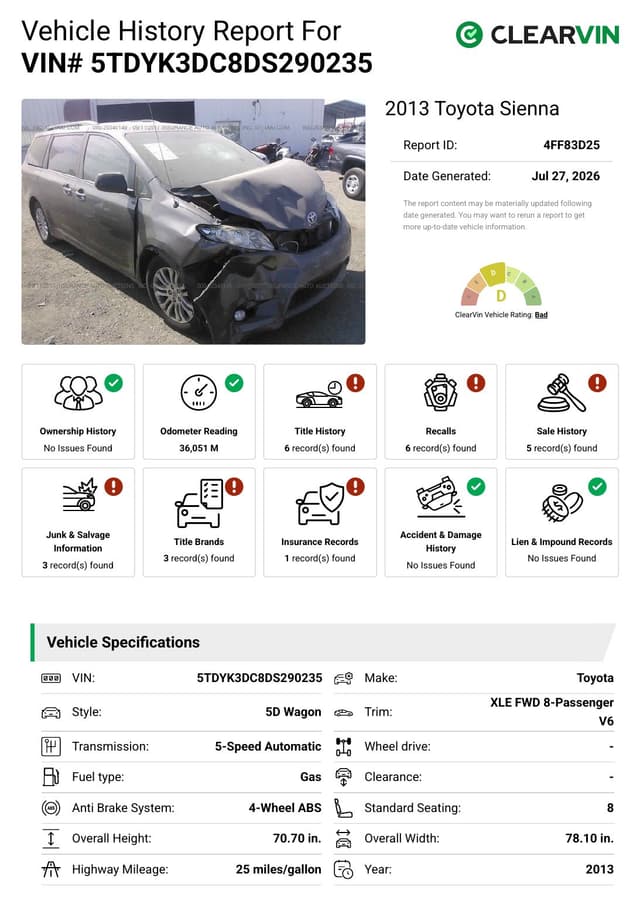
The sample here: a 2013 Toyota Sienna the provider graded D
The sample report on this site is an original provider document, report 4FF83D25, generated Jul 27, 2026, on a 2013 Toyota Sienna XLE FWD 8-Passenger (5D Wagon, 3.5L V6 EFI DOHC 24V). The provider's own rating on page 1 is D, labelled "Bad". It is a fixed public sample: its findings apply only to its printed VIN.
By count, the document holds 6 title records, 3 title brands, 3 odometer readings, 3 salvage records, 5 sale events, 2 auction events, 6 market-value figures, 6 recall campaigns and 3 states reporting no brand. Every one of those counts is read from the sample data at build time, so this page cannot drift from the document it describes.
Reading the records that decide a deal
Title brands first. This sample carries 3: Rebuilt, reported in Utah on Sep 10, 2019; Salvage, reported in California on Nov 4, 2017; Not Actual, reported in California on Nov 4, 2017. A Salvage brand followed two years later by a Rebuilt brand in another state is the sequence to look for on any report — it means a total-loss vehicle was repaired and re-titled, and the odometer line next to it deserves the closest read.
Odometer readings are a timeline, not a number. The sample lists 3 readings; the check is whether they rise in order and whether any reading is flagged "Not Actual", which this vehicle's brand list also carries. Salvage records (3 here) and auction events (2) sit alongside them and usually explain a gap.
Recalls are the section people skip. This vehicle has 6 campaigns on file, the earliest Jan 16, 2013 (13V014000, Air bags · occupant sensing). An eligible remedy is generally free through the manufacturer's approved process; an unrepaired campaign is a point to resolve before purchase, and NHTSA's free VIN lookup can show whether it is still open.
Sale events (5 here) and market values (6 figures) are context, not verdict. They show what the car changed hands for and what comparable vehicles list at; they do not tell you what this one is worth today.
What the $14.99 report shows against a Carfax report
Both are vehicle history reports and both draw on reported events: accidents and damage when reported, title brands such as salvage, flood and lemon when reported, odometer readings and rollback signals when reported. Neither provider guarantees that every event was reported, and both say so in their own terms.
Compare the actual sample and current checkout for each product. VIN Lookup offers a free identity check and, when available, a limited history preview. Title brands, accident counts, ownership counts and odometer readings are not supplied by our free preview endpoint. The optional full report costs $14.99, paid once with no subscription.
Check the VIN of the car you are considering
Enter the VIN to confirm the year, make and model free. Available preview information may include historical listing images, auction counts and recall campaigns. To review returned title, mileage and other history entries, compare the original sample with what you need, then choose whether to buy the full $14.99 report. Availability and records vary by vehicle.
Buyer checklist
- Open the brand list first: Salvage, Rebuilt, Flood, Lemon or Not Actual decide the price before anything else does.
- Read the odometer readings as a sequence; a drop, or a "Not Actual" flag, is the line to ask the seller about.
- Match any salvage or auction record to the brand dates; the gap between them is the repair history you cannot see.
- Check every recall against NHTSA by VIN; confirm the approved remedy and no-charge eligibility for each open campaign.
- Run the free preview on the real VIN before paying for any report, on any site.
- Compare like with like: a sample is a fixed document, and no sample tells you about your car.
What this research cannot prove
- The annotated document here is a ClearVIN sample, not a CARFAX report or a same-VIN comparison of both providers.
- The provider sample is a fixed public document on a different VIN; its counts describe that vehicle, not yours.
- Both reports rely on events that were reported; an unreported accident or an unfiled brand appears on neither.
- Published CARFAX and Edmunds examples disagree on CARFAX prices, and Edmunds's table and prose disagree on one pack size. The sellers' live checkouts were not verified in this review (September 23, 2026). Check the seller's current price, pack size, expiry and total before buying.
Sources reviewed
Open the underlying public source and verify that its scope matches the question you are asking.
- View a Sample CARFAX ReportCARFAX
- Sample report 4FF83D25 — 2013 Toyota SiennaVIN Lookup, original provider document
- How to read a CARFAX ReportCARFAX
- AutoCheck vs. Carfax: Which Vehicle History Report Is Best for You?Edmunds
- AutoCheck Vehicle History ReportsAutoCheck
- Recalls by VINNHTSA
- Approved NMVTIS Data Providers — checked October 26, 2026U.S. Department of Justice, Bureau of Justice Assistance
- How the remaining-warranty estimate is calculatedCARFAX
- Vehicle History Report record categoriesCARFAX
Frequently asked questions
Where can I see a Carfax sample report?
CARFAX publishes its official example at carfax.com/company/sample-carfax-report. The annotated sample on this site is a separate ClearVIN report.
Is the sample on this site a Carfax report?
No. It is an original provider document from this site's report provider — report 4FF83D25, generated Jul 27, 2026 — on a 2013 Toyota Sienna. It is shown so you can see how title brands, odometer readings, salvage records and recalls read on a real report.
What does a sample report tell me about the car I want to buy?
A sample describes its own VIN. Use it to understand the report format, then check your vehicle separately. Our free check confirms identity; available preview data may add image and auction counts and recall campaigns, not the full history.
How much is a Carfax report compared with the $14.99 report?
This site's report is $14.99 as a one-time purchase with no subscription. CARFAX's current single-report price must be checked at its own checkout. Published CARFAX and Edmunds examples disagree on CARFAX prices, and Edmunds's table and prose disagree on one pack size. The sellers' live checkouts were not verified in this review (September 23, 2026). Check the seller's current price, pack size, expiry and total before buying.
Why is the sample vehicle graded D?
The provider's rating on page 1 is D, labelled "Bad", and the brand list explains it: Rebuilt, Salvage, Not Actual, reported across 2 states. A Salvage brand followed by a Rebuilt brand is a total-loss vehicle that was repaired and re-titled.